JavaScript Operators Cheat Sheet
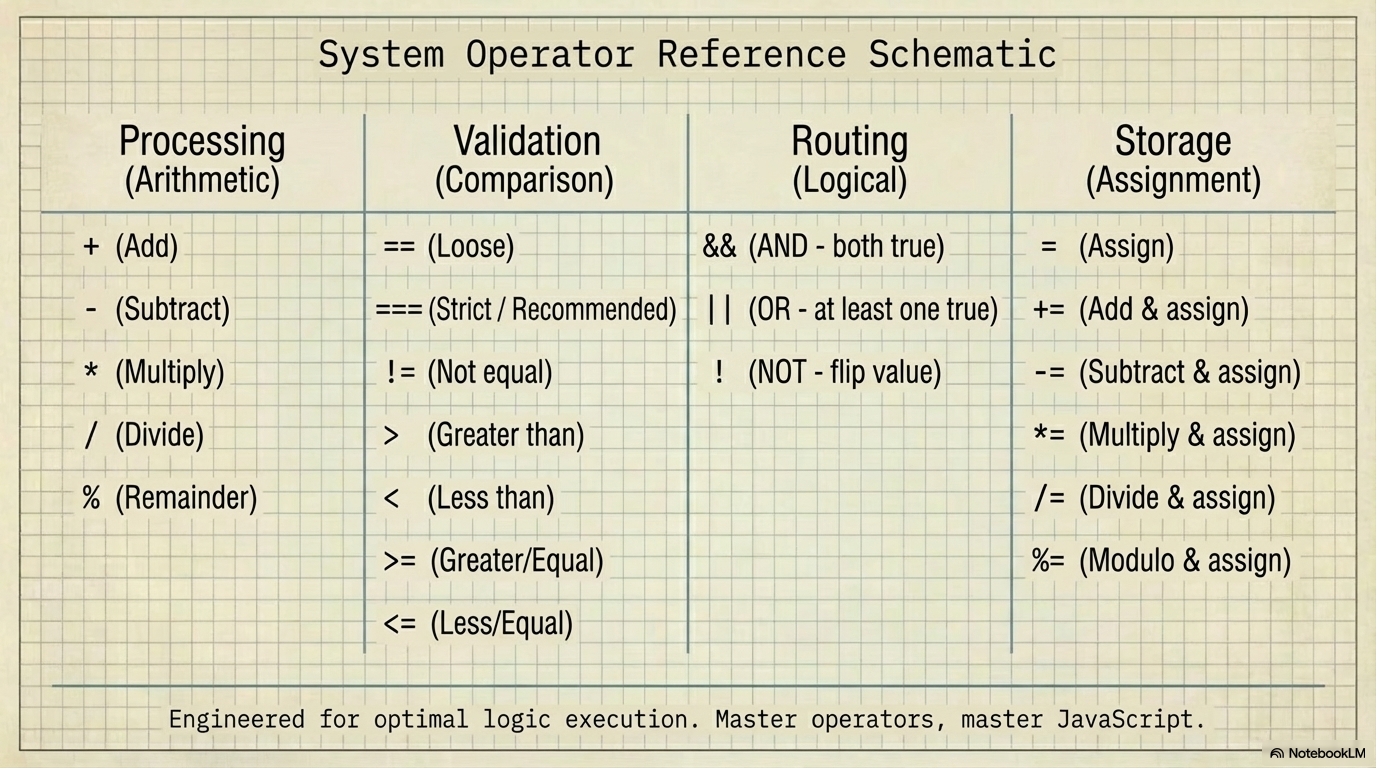
The Core Idea
1. Arithmetic Operators
5 + 3    // 8   (Addition)
10 - 4   // 6   (Subtraction)
4 * 3    // 12  (Multiplication)
15 / 3   // 5   (Division)
17 % 5   // 2   (Remainder)
💡 Pro Tip: Use % to check even/odd:
10 % 2 === 0  // true (even)
7 % 2 === 1   // true (odd)
2. Comparison Operators
| Operator | Meaning | Example | Result |
|---|---|---|---|
=== |
Strict equal | 5 === 5 |
true ✓ |
!== |
Strict not equal | 5 !== "5" |
true ✓ |
> |
Greater than | 10 > 5 |
true |
< |
Less than | 3 < 7 |
true |
>= |
Greater/equal | 5 >= 5 |
true |
<= |
Less/equal | 4 <= 3 |
false |
⚠️ Always use
===not==5 == "5"→true(converts types)5 === "5"→false(exact match only)
3. Logical Operators
| Operator | Name | Rule |
|---|---|---|
&& |
AND | Both must be true |
| ` | ` | |
! |
NOT | Flips the value |
true && true    // true
true && false   // false
true || false   // true
!true           // false
Real example:
let hasID = true;
let isAdult = true;

let canEnter = hasID && isAdult;  // true
4. Assignment Shortcuts
| Long Form | Shorthand | Result |
|---|---|---|
x = x + 5 |
x += 5 |
Add 5 |
x = x - 1 |
x -= 1 |
Subtract 1 |
x = x * 2 |
x *= 2 |
Multiply by 2 |
x = x / 2 |
x /= 2 |
Divide by 2 |
⚠️ JavaScript Quirks & Gotchas
The Unary + Operator (Quick Number Parsing)
+"533"        // 533 (number)
+"12.34"      // 12.34 (number)
+true         // 1
+false        // 0
+null         // 0
+""           // 0
+"abc"        // NaN (Not a Number)
Use case: Fastest way to convert string to number. Shorter than
Number("533")orparseFloat("533").
The + Operator: Addition vs Concatenation
5 + 3         // 8 (number)
"5" + 3       // "53" (string concatenation!)
5 + "3"       // "53" (string wins)
5 + 3 + "2"   // "82" (left to right: 8 + "2")
"5" + 3 + 2   // "532" (string from start)
Rule: If either operand is a string,
+becomes concatenation.
Loose Equality (==) Madness
0 == "0"      // true
0 == []       // true
"0" == []     // false (!)

null == undefined   // true
null == 0           // false
undefined == 0      // false

"" == false   // true
"" == 0       // true
"0" == false  // true
Fix: Just use
===and sleep better.
Logical Operators Return Values (Not Just Booleans)
"hello" && "world"   // "world" (returns last truthy)
"hello" || "world"   // "hello" (returns first truthy)
"" || "fallback"     // "fallback"
0 || 42              // 42

// Common pattern: Default values
const username = input || "guest";
Falsy Values in Logic
These evaluate to false in conditions:
false, 0, "" (empty string), null, undefined, NaN

// Surprisingly truthy:
"0"           // true (non-empty string)
"false"       // true (non-empty string)
[]            // true (empty array)
{}            // true (empty object)
Floating Point Math Errors
0.1 + 0.2 === 0.3     // false!
0.1 + 0.2             // 0.30000000000000004

// Fix: Round for display
(0.1 + 0.2).toFixed(2)  // "0.30"
Math.round((0.1 + 0.2) * 100) / 100  // 0.3
The typeof Gotcha
typeof null           // "object" (bug from 1995!)
typeof NaN            // "number" (NaN is a number?!)
typeof []             // "object" (arrays are objects)
Array.isArray([])     // true (proper way to check)
Quick Reference Card
ARITHMETIC:  +  -  *  /  %
COMPARISON:  ===  !==  >  <  >=  <=
LOGICAL:     &&  ||  !
ASSIGNMENT:  =  +=  -=  *=  /=
UNARY:       +  -  !  typeof
Golden Rules:
Use
===for equalityUse
+xfor quick number conversionUse
Array.isArray()to check arraysNever trust floating point math
2 views