

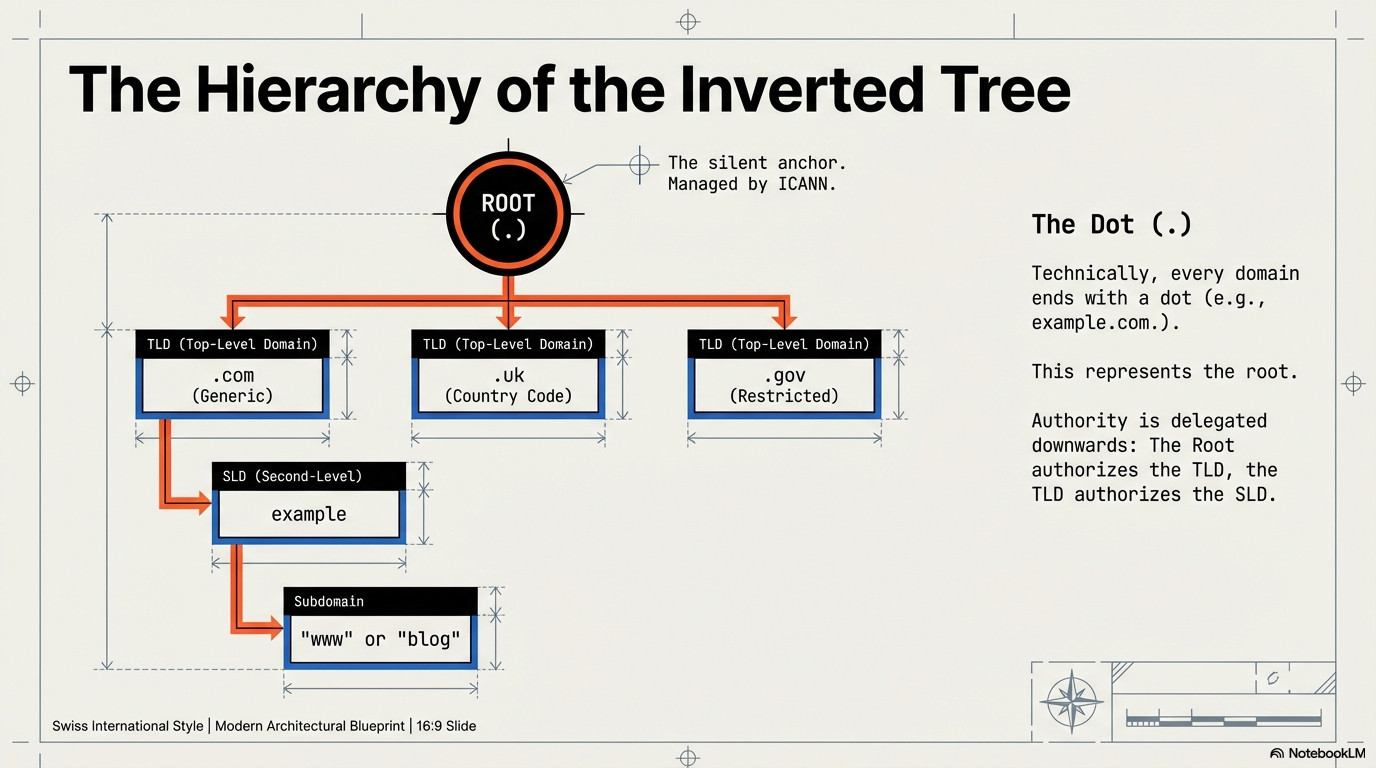
Here's something most people don't realize: DNS isn't a single server. It's a distributed, load-balanced architecture built on layers of abstraction. When you resolve a domain, you're not hitting one database—you're traversing a hierarchy of specialized servers, each handling a specific part of the namespace.
Let's explore how this works using dig, the tool that lets you peek behind the curtain.
What is dig?
dig stands for Domain Information Groper (yes, really). It's a command-line tool for DNS lookups and debugging. Network engineers use it to troubleshoot DNS issues, inspect record types, and trace resolution paths.
Basic Syntax
dig [@server] domain [query-type] [query-class]
@server: IP address or hostname of the DNS server to query (optional)domain: What you're looking upquery-type: Record type (A, AAAA, NS, MX, etc.)
Key Detail: UDP and the 512-Byte Limit
dig operates over UDP and has a 512-byte response limit (unless using EDNS). This matters when querying root servers—you'll see truncated responses with large result sets.
The Three-Level Hierarchy
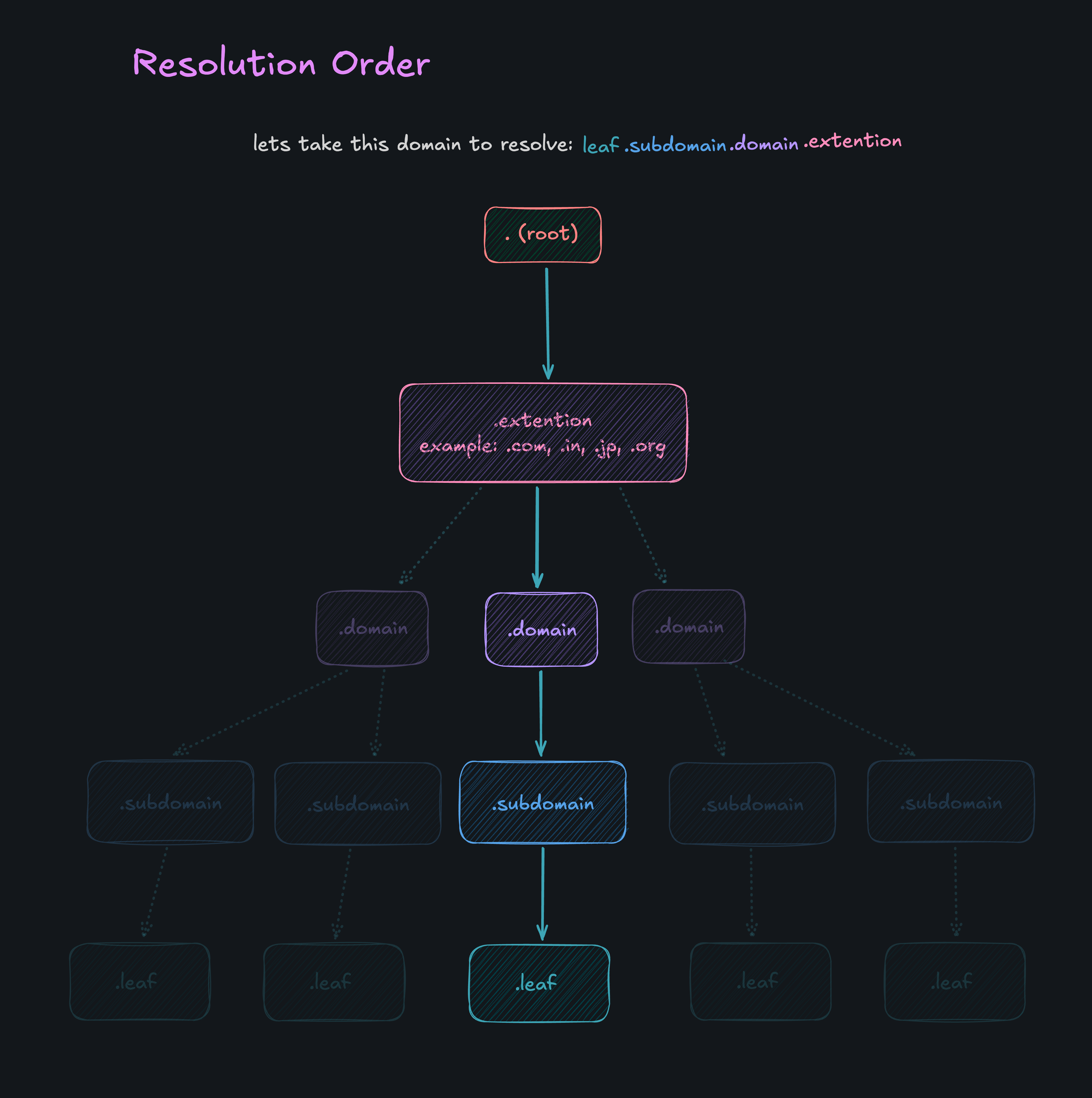
DNS resolution follows a top-down traversal through three distinct layers:
1. Root Nameservers (.)
The starting point. There are 13 root nameserver identities (A through M), but each has hundreds of replicas distributed globally via anycast. When you query the root, you're asking: "Which TLD servers handle this extension?"
2. Top-Level Domain (TLD) Nameservers
Specialized servers for extensions like .com, .org, .jp, .in. They don't know individual domains—they just point you to the authoritative nameserver for that domain.
3. Authoritative Nameservers
The final stop. This is your domain provider (Cloudflare, GoDaddy, AWS Route 53). The authoritative server holds the actual A/AAAA records (IP addresses) or MX records (mail servers).
The Goal: Reach the A/AAAA Record (or MX for Mail)
Every DNS query has one goal: get the actual record you need—usually an A/AAAA record (IP address), but sometimes an MX record if you're a mail server looking for where to deliver email. The problem? You don't know where google.com is hosted. But you do know where the root servers are—they're hardcoded into every resolver.
Let's trace google.com from root to IP using dig.
Step 1: Query the Root Server
Start at the top. Ask any root server: "Who handles .com?"
dig @a.root-servers.net . NS
Output (truncated):
;; ANSWER SECTION:
.                        518400  IN      NS      a.root-servers.net.
.                        518400  IN      NS      b.root-servers.net.
...
.                        518400  IN      NS      m.root-servers.net.
You see all 13 root servers listed. Now query for .com:
dig @a.root-servers.net com NS
Output:
;; AUTHORITY SECTION:
com.                    172800  IN      NS      a.gtld-servers.net.
com.                    172800  IN      NS      b.gtld-servers.net.
...
The root server responds: "Ask the gTLD servers for .com."
Step 2: Query the TLD Server
Now ask the .com TLD server: "Who's authoritative for google.com?"
dig @a.gtld-servers.net google.com NS
Output:
;; AUTHORITY SECTION:
google.com.             172800  IN      NS      ns1.google.com.
google.com.             172800  IN      NS      ns2.google.com.
google.com.             172800  IN      NS      ns3.google.com.
google.com.             172800  IN      NS      ns4.google.com.
The TLD server responds: "Ask Google's nameservers directly."
Step 3: Query the Authoritative Server
Finally, ask Google's nameserver: "What's the IP for google.com?"
dig @ns1.google.com google.com A
Output:
;; ANSWER SECTION:
google.com.             300     IN      A       142.250.192.46
There it is. The authoritative server returns the A record with the actual IP address.
Understanding the dig Output
Every dig response has several sections:
QUESTION SECTION
What you asked for.
;; QUESTION SECTION:
;google.com.                    IN      A
ANSWER SECTION
The direct answer (only present at authoritative level).
;; ANSWER SECTION:
google.com.             300     IN      A       142.250.192.46
AUTHORITY SECTION
Points to the next nameserver in the hierarchy.
;; AUTHORITY SECTION:
google.com.             172800  IN      NS      ns1.google.com.
ADDITIONAL SECTION
IP addresses of nameservers mentioned in AUTHORITY (prevents circular lookups).
Why Only 13 Root Servers?
When you run:
dig . NS
You'll see exactly 13 NS records. This isn't arbitrary—it's a 512-byte UDP packet limit. Fitting more root servers would exceed that size, causing truncation.
But here's the thing: those 13 identities have hundreds of physical servers worldwide using anycast routing. You're never hitting "one" root server—you're hitting the nearest replica.
For more on how DNS resolution works end-to-end, check out my previous post.
Tracing a Subdomain
What if you're resolving mail.google.com? Same process, but the authoritative server handles the subdomain:
dig @ns1.google.com mail.google.com A
The authoritative server knows all subdomains under google.com. If mail has a separate NS record, you might need another hop. Otherwise, it returns the A record directly.
Key Takeaways
DNS is hierarchical, not centralized. Root → TLD → Authoritative.
Each layer only knows the next step. Root servers don't know your domain; TLD servers don't know your IP.
dig lets you trace the full path. Query each layer manually to see how resolution works.
The 13 root servers are identities, not machines. Anycast routing distributes load across hundreds of replicas.
This hierarchy is why DNS is resilient. No single point of failure—just layers of delegated authority. Understanding this helps you debug issues, optimize TTLs, and appreciate the engineering behind every website load.
The takeaway: DNS resolution is a structured descent through three layers—each server knows just enough to point you to the next one. Tools like dig reveal this journey step by step.


