

DNS Record Types: The Data Behind Domain Names
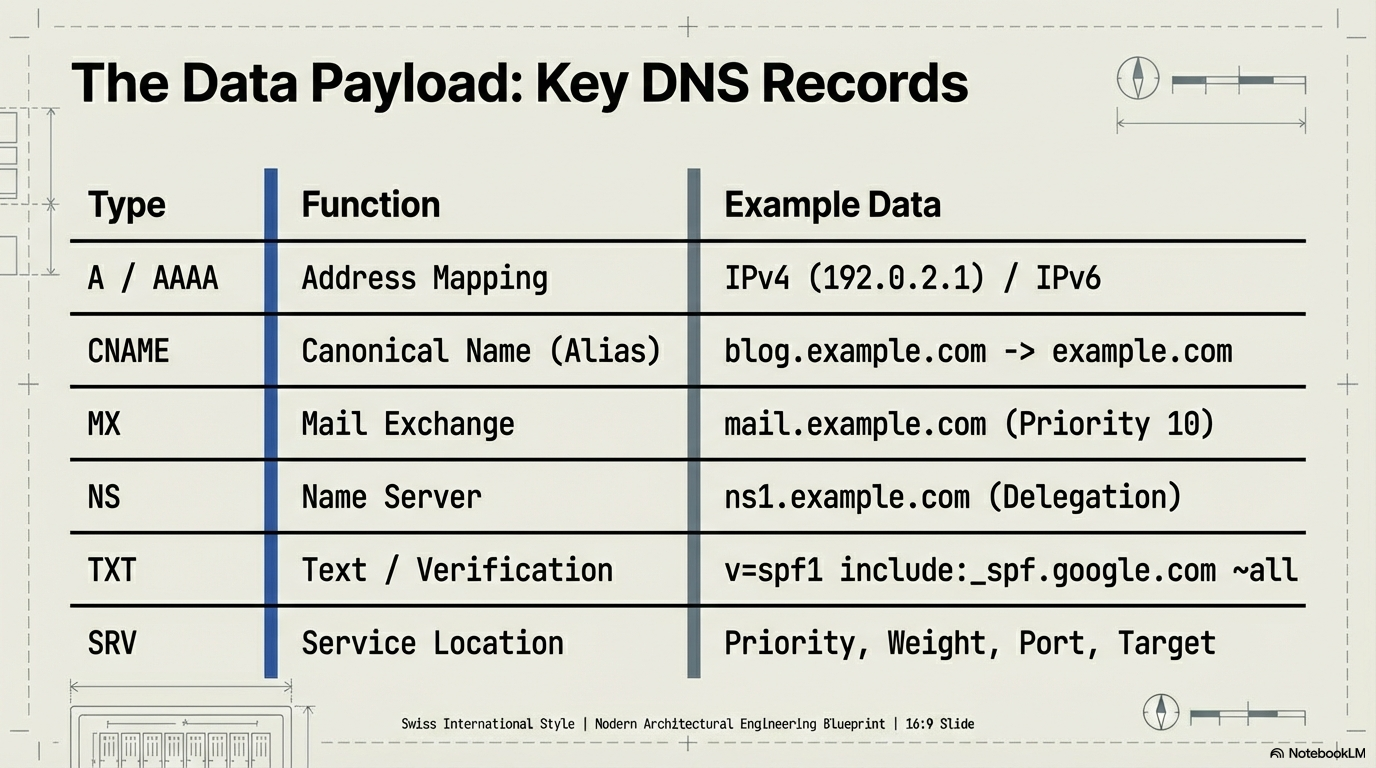
DNS isn't just about translating domains to IPs. It's a database storing over 60 standardized record types, each serving specific functions—from email routing to security verification to service discovery.
Here's what these records actually do and when they matter.
DNS Resolution: A Quick Refresher
Before diving into record types, here's the hierarchy:
Root (.) → Extension (.com) → Domain (example) → Subdomain (mail) → Leaf
When you query mail.example.com, DNS resolves from right to left:
Root servers point to
.comTLD serversTLD servers point to
example.com's authoritative nameserverAuthoritative nameserver resolves
mail.example.comto its record
Each level can store different record types. Understanding which records live where matters for troubleshooting and configuration.
For more on how DNS resolution works end-to-end, check out my previous post on DNS resolvers.
The Core Record Types
Address Mapping: A / AAAA
Function: Map domain names to IP addresses.
A record: IPv4 address (e.g.,
192.0.2.1)AAAA record: IPv6 address (e.g.,
2601:645:8400:11a8::f171/64)
These are the terminal records—the end goal of most DNS queries. Every website needs at least one.
Example:
example.com. 300 IN A 192.0.2.1
The 300 here is the TTL (Time To Live) in seconds—how long resolvers should cache this record before checking for updates. A 300-second (5-minute) TTL means if you change your IP address, it could take up to 5 minutes for all resolvers globally to pick up the change.
Note: Because of caching at multiple levels (browser, OS, ISP resolver), cache invalidation is notoriously difficult. You can't force every resolver worldwide to refresh immediately. This is why lowering your TTL before making DNS changes is a common strategy.
There's also APL (Address Prefix List) for advanced routing scenarios, but it's rarely used outside specialized network configurations.
Aliases and Redirects: CNAME
Function: Point one domain to another domain (canonical name).
CNAME lets you alias multiple subdomains to a single target. If you need to change servers, you update one A record instead of dozens.
Example:
blog.example.com.    CNAME    example.com.
www.example.com.     CNAME    example.com.
Both blog and www now resolve to wherever example.com points.
Critical limitation: CNAME records cannot coexist with other record types at the same name. You can't have a CNAME and an MX record for the same subdomain.
(There are alternatives like DNAME and ALIAS/ANAME for apex domains, but they're less common.)
Mail Routing: MX
Function: Direct email traffic to mail servers.
When you send an email to user@example.com, your mail server queries the MX record for example.com to find where mail should be delivered.
Example:
example.com.    MX    10    mail.example.com.
example.com.    MX    20    backup-mail.example.com.
The number (10, 20) is the priority—lower is higher priority. Mail servers try the lowest priority first, then fail over to higher numbers if the primary is unreachable.
Key detail: MX records point to hostnames, not IPs. Those hostnames must have their own A/AAAA records.
Delegation: NS
Function: Specify which nameservers are authoritative for a domain or subdomain.
NS records delegate authority. When you register a domain, your registrar sets NS records at the TLD level pointing to your chosen nameserver (Cloudflare, AWS Route 53, etc.).
Example:
example.com.    NS    ns1.example.com.
example.com.    NS    ns2.example.com.
You can also use NS records to delegate subdomains to different nameservers:
subdomain.example.com. NS ns1.subdomain-provider.com.
This is useful for reducing traffic on your main nameserver or letting a third party manage part of your DNS.
Administrative Metadata: SOA
Function: Store administrative info about a DNS zone.
SOA (Start of Authority) records define the primary nameserver, contact email, serial number (for zone updates), and timing parameters (refresh, retry, expire).
You typically don't interact with SOA records directly—they're auto-generated by your DNS provider—but they're required for every zone.
Reverse Lookups: PTR
Function: Map IP addresses back to hostnames.
PTR records are the inverse of A records. They live in a special DNS zone (like in-addr.arpa) and are primarily used for email validation—many mail servers check if your IP has a valid PTR record to combat spam.
Example:
1.2.0.192.in-addr.arpa. PTR mail.example.com.
Text and Metadata: TXT
Function: Store arbitrary text; used for verification and security.
TXT records are incredibly versatile. They don't point to IPs or other servers—they just return text strings. Common uses:
Domain verification (Google, Microsoft, etc.)
Email security protocols (SPF, DKIM, DMARC)
Site ownership proof
Example:
example.com. TXT "v=spf1 include:_spf.google.com ~all"
There's no standard format—TXT records are just key-value pairs (conceptually). Don't use them to store actual data, but they're perfect for metadata.
Certificate Authority: CAA
Function: Specify which certificate authorities can issue SSL/TLS certificates for your domain.
CAA records add a security layer by whitelisting CAs. If a CA receives a certificate request for your domain but isn't listed in your CAA record, they should refuse it.
Example:
example.com. CAA 0 issue "letsencrypt.org"
Service Location: SRV
Function: Define hostname and port for specific services.
SRV records specify where services like XMPP, SIP, or LDAP are hosted. They include priority, weight, port, and target.
Example:
_xmpp._tcp.example.com. SRV 10 5 5222 xmpp.example.com.
Note: SRV records are typically used by software teams for service discovery and debugging—not something you'd configure for public-facing websites. They're more common in internal infrastructure and enterprise environments.
Geolocation: LOC
Function: Store geographic coordinates.
LOC records embed latitude, longitude, and altitude. Rarely used, but exist for location-based services.
Deep Dive: Confusing Points
NS vs CNAME: What's the Difference?
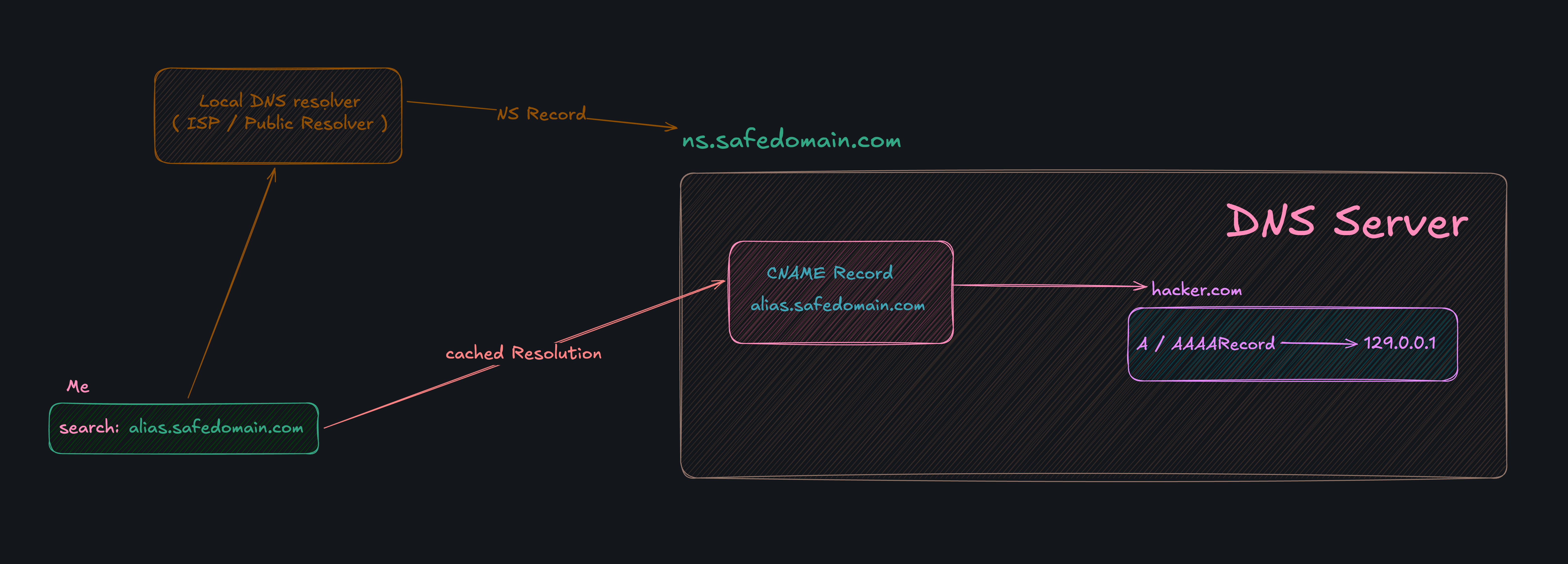
NS records delegate authority—they say "this nameserver is responsible for answering queries about this domain."
CNAME records create aliases—they say "this domain is just another name for that domain."
Example:
subdomain.example.com.    NS     ns1.provider.com.    # Delegation
blog.example.com.         CNAME  example.com.          # Alias
If you use an NS record, queries for subdomain.example.com go to ns1.provider.com, which can return any record type.
If you use a CNAME, queries for blog.example.com are redirected to example.com—the resolver then looks up example.com's A record.
Critical: You can't have a CNAME at the apex (root domain). That's why services like Cloudflare invented ALIAS/ANAME records as a workaround.
How MX Records Actually Work
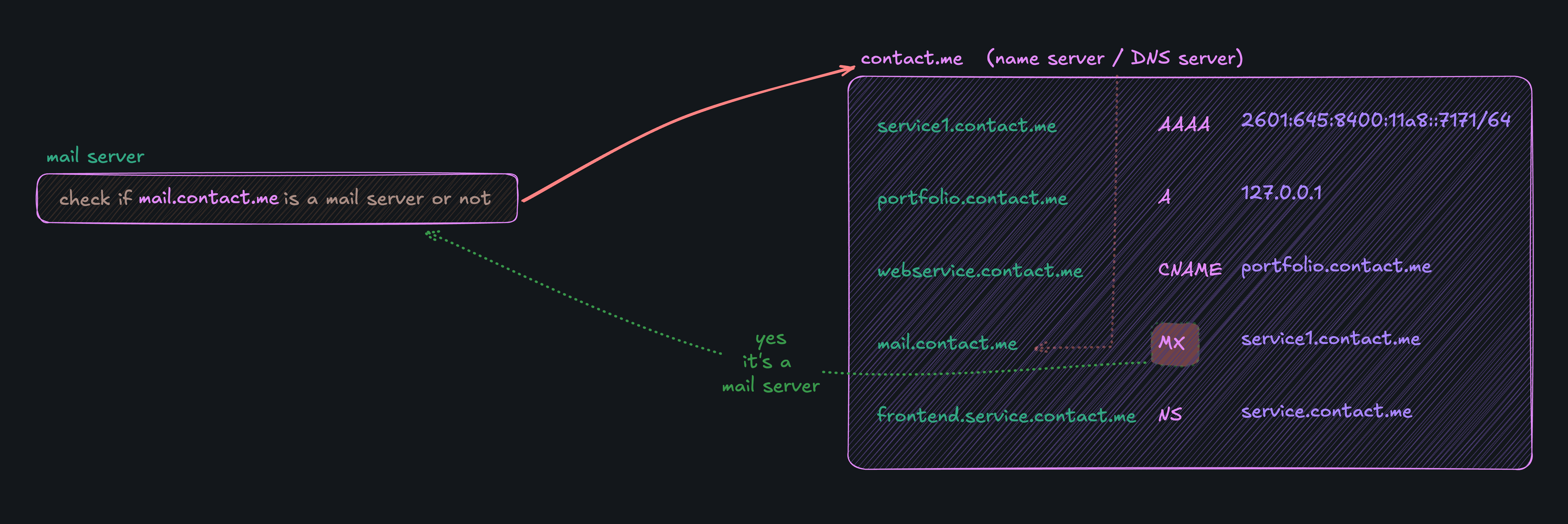
When a mail server wants to send email to user@example.com, here's the flow:
Query the MX record for
example.com.
Result:mail.example.com(priority 10)Resolve
mail.example.comto an IP.
Query the A/AAAA record formail.example.com.
Result:192.0.2.1Connect to
192.0.2.1on port 25 (SMTP) and deliver the email.
If the primary MX server (priority 10) is down, the mail server tries the next priority (20), and so on. If all fail, it keeps retrying for days before giving up.
Important: MX records must point to hostnames, not IPs. You can't do:
example.com. MX 10 192.0.2.1 # INVALID
TXT Records: The Metadata Swiss Army Knife
TXT records store arbitrary text with no enforced structure. Different services use different formats:
SPF (Email sender validation):
example.com. TXT "v=spf1 include:_spf.google.com ~all"
DKIM (Email authentication):
selector._domainkey.example.com. TXT "v=DKIM1; k=rsa; p=MIGfMA0GCS..."
Domain verification:
example.com. TXT "google-site-verification=abc123"
There's no limit on what you can put in a TXT record, but keep it under 255 characters per string (you can chain multiple strings for longer values).
Don't abuse TXT records for application data. They're meant for metadata and verification, not as a general-purpose key-value store.
Summary
DNS records are the data payload behind domain resolution. Here's the cheat sheet:
| Record Type | Purpose | Example |
| A / AAAA | Map domain to IPv4/IPv6 | 192.0.2.1 |
| CNAME | Alias one domain to another | blog.example.com → example.com |
| MX | Route email to mail servers | mail.example.com (priority 10) |
| NS | Delegate authority to nameservers | ns1.example.com |
| TXT | Store text for verification/security | "v=spf1 include:_spf.google.com" |
| CAA | Whitelist certificate authorities | issue "letsencrypt.org" |
| SRV | Specify service location (port + host) | 5222 xmpp.example.com |
Understanding these records means you can debug DNS issues, configure email properly, and secure your domain against misuse.
The takeaway: DNS isn't just A records. Each record type serves a specific role in the internet's infrastructure—knowing when to use which makes all the difference.


